Managing multiple advertising campaigns across different platforms can be challenging. This is especially true for digital marketing agencies managing several Google Ads campaigns for different clients.
An agency ad account helps marketing agencies manage their clients’ advertising activities in a structured manner. It can make it easier to organize multiple client accounts, manage campaigns, control user access, and review advertising performance.
Before using an agency-managed advertising setup, businesses should understand who owns the account, who has access to it, who controls billing, and what happens to the account if the agency relationship ends.
So, what is an agency ad account, and how does it work? This guide explains the concept, how agencies use these account structures, their benefits and potential issues, and what businesses should consider before giving an agency access to their advertising accounts.
What Is an Agency Ad Account?
An agency ad account is an advertising account or account management structure used by a digital marketing agency to manage paid advertising campaigns for one or more clients.
Instead of managing every client account separately, an agency can use a centralized management structure to organize and manage multiple advertising accounts.
For example, an agency may manage:
- Client Name 1
- Client Name 2
- Client Name 3
- Client Name 4
Each client may have different campaigns, budgets, keywords, audience targeting, conversion tracking, and advertising goals.
The exact structure can vary depending on the advertising platform and the agreement between the agency and the client.
How Does an Agency Ad Account Work?
An agency ad account works through a management structure that allows an agency to handle advertising accounts and campaigns for its clients.
For Google Ads, agencies commonly use a Manager Account, historically known as an MCC.
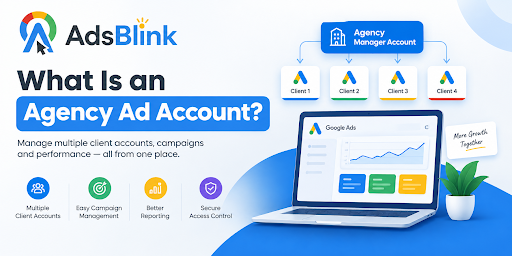
A Google Ads Manager Account allows an agency to connect and manage multiple Google Ads accounts from a centralized location.
For example:
Agency Manager Account
- Client A Google Ads Account
- Client B Google Ads Account
- Client C Google Ads Account
- Client D Google Ads Account
With this structure, an agency can manage multiple client accounts without having to log in and out of separate accounts individually.
However, connecting an account to a Manager Account does not automatically mean that the agency owns the client's advertising account.
Agency Ad Account vs. Standard Ad Account
|
Feature |
AccountStandard Advertising |
Agency Ad Account Arrangement |
|
Account Management |
Generally managed individually |
Can be managed through an agency structure |
|
Multiple Clients |
Not designed primarily for agency management |
Designed for managing numerous client accounts |
|
Centralized Management |
Limited |
Available through manager structures |
|
Client Access |
Depends on account setup |
Can be controlled through permissions |
|
Campaign Management |
Individual account |
Multiple accounts managed |
The exact management features depend on the advertising platform and account structure.
Why Do Agencies Use Manager Accounts?
Centralized Account Management
A Manager Account gives an agency a centralized location from which it can manage multiple advertising accounts.
This can be useful for agencies that handle campaigns for several businesses at the same time.
1. Managing Connected Accounts
Instead of accessing each client account individually, an agency can connect client accounts to a Manager Account and access them through a centralized interface.
2. Managing Multiple Clients
Agencies often work with multiple businesses, and each business may have different advertising campaigns, budgets, audiences, and goals.
A centralized structure can make it easier to organize these accounts and manage advertising tasks.
3. Organizing Accounts
Client accounts can remain separate while being managed through an agency's centralized structure.
This helps agencies keep campaign information and advertising activities organized for different clients.
4. Reporting
Agencies can access campaign information from connected client accounts and use that information to prepare performance reports according to their reporting process.
5. User Access
Different users can receive access according to their responsibilities and permissions.
For example, one team member may manage campaigns while another may primarily review performance and reports.
What Is a Google Ads MCC?
A Google Ads MCC, historically known as My Client Center, refers to the Manager Account structure used to manage multiple Google Ads accounts.
A Manager Account provides a centralized dashboard where multiple client accounts can be connected and managed.
For example:
Agency Manager Account
- Client 1 Account
- Client 2 Account
- Client 3 Account
- Client 4 Account
Each client account can have different campaigns, budgets, targeting settings, conversion actions, and other advertising configurations.
Using a Manager Account allows an agency to manage connected accounts from one central location.
Do Agencies Automatically Own Client Google Ads Accounts?
No. Connecting a client's Google Ads account to an agency's Manager Account does not automatically mean the agency owns the client account.
Access and ownership are different things.
The account structure, permissions, and agreements between the agency and client determine how access and control are handled.
Before starting advertising campaigns, businesses should clearly establish:
- Who owns the advertising account
- Who has administrative access
- Who manages the campaigns
- Who controls billing
- Who owns campaign and performance data
- What happens when the agency relationship ends
Clearly defining these responsibilities can reduce misunderstandings later.
Can a Client Use Their Google Ads Account Directly?
Yes, depending on how the account and permissions are configured.
Using an agency to manage advertising does not necessarily mean that the client loses access to its Google Ads account.
Depending on the permissions provided, a client may be able to:
- View campaigns and performance
- Check advertising spend
- Review reports
- Access account settings
- Review account activity
- Make changes allowed by their permission level
The exact level of access depends on the account's configuration and user permissions.
What Are the Advantages of an Agency Ad Account?
There are several potential benefits to using an agency-based advertising account structure.
Centralized Management
An agency can manage multiple client accounts from a centralized management location.
This can save time when an agency is responsible for many advertising accounts.
Better Client Account Separation
Client accounts can remain separate from one another even when they are managed through the same agency structure.
This helps keep each client's campaigns, budgets, targeting, and performance information organized separately.
Improved Agency Collaboration
An agency can provide access to different team members based on their responsibilities.
For example, campaign managers, analysts, and account managers may have different levels of access.
Simplified Reporting
A centralized structure can make it easier for an agency to review client campaign information and prepare regular reports.
Managing Multiple Accounts
Manager structures can become increasingly useful as an agency works with more clients and advertising accounts.
Potential Problems With Agency Ad Accounts
An agency account structure can also create challenges if ownership, access, and responsibilities are not clearly defined.
Confusion About Ownership
A client may not understand who owns the advertising account or who will retain control of it after the agency relationship ends.
This should be discussed before campaigns are launched.
Access Issues
Problems can occur when users have either too much or too little access.
Businesses should understand who has access and what each user is allowed to do.
Billing Issues
The client and agency should clearly establish who is responsible for advertising payments and how billing will be handled.
Communication Problems
Unclear responsibilities between an agency and client can create confusion about campaign management, reporting, billing, and account access.
Problems When Switching Agencies
When a business changes agencies, unclear account ownership or access arrangements can make the transition more difficult.
For this reason, the exit process should be discussed at the beginning of the agency relationship.
Agency Account Structure vs. Allowing Agency Access to an Account
These two arrangements are not necessarily the same.
Allowing Agency Access to an Account
In this arrangement, the business keeps its advertising account while giving the agency permission to manage campaigns.
The business can retain control of the account while the agency works on its advertising activities.
Agency-Managed Account Structure
In an agency-managed structure, the agency may create or manage advertising accounts and connect them through its management system.
Before campaigns begin, the agency and client should clearly define ownership, access, billing, data, campaign control, and the process for ending the relationship.
Can Agency Ad Accounts Be Used With Other Ad Platforms?
Yes.
Different advertising platforms have their own account structures, business managers, agency access systems, and permission settings.
Agencies may manage advertising campaigns across platforms such as:
- Google Ads
- Meta Ads
- Facebook and Instagram
- YouTube
- TikTok
- Microsoft Advertising
However, the terminology and account-management processes can vary between platforms.
An arrangement that works on Google Ads may not work in exactly the same way on another advertising platform.
When Should a Business Use an Agency Ad Account?
An agency-based advertising setup may be considered when a business wants professional support with its paid advertising campaigns.
This may be relevant to a business that:
- Works with a digital marketing agency
- Runs multiple advertising campaigns
- Requires professional PPC management
- Needs multiple users to access advertising accounts
- Wants regular campaign reporting
- Advertises across multiple platforms
The appropriate structure depends on the business, agency agreement, account ownership preferences, billing arrangements, and advertising requirements.
What Is the Right Setup for the Business?
There is no single account structure that applies to every business.
The appropriate setup depends on factors such as:
- Who should own the advertising account
- Who will manage campaigns
- Who should have administrative access
- How advertising spend will be paid
- How campaign data will be accessed
- How reporting will be handled
- What happens when the agency relationship ends
Businesses should discuss these points with their agency before starting paid advertising.
What Should You Look Out for Before Giving Agency Access?
Before giving an agency access to an advertising account, businesses should ask several important questions.
1. Account Ownership
Who owns the advertising account?
Also ask what happens to the account if the agency relationship is terminated.
2. User Access
Who will receive access to the account?
Ask what level of access each agency team member will receive.
3. Billing
Who will pay for the advertising spend?
The client and agency should agree on how billing and payments will be handled.
4. Reporting
How often will campaign performance be reported?
Ask what information will be included in the reports.
5. Control of Campaigns
Who will make changes to campaigns, budgets, targeting, keywords, and other advertising settings?
6. Data Access
Ask how the business will access campaign, conversion, audience, and performance data.
7. Exit Process
Find out what happens to the advertising account, campaigns, data, billing arrangements, and user access if agency services are terminated.
Knowing the answers to these questions can reduce the possibility of confusion between the agency and the client.
Frequently Asked Questions
What Is an Agency Ad Account?
An agency ad account is an advertising account or management structure used by a digital marketing agency to manage paid advertising campaigns for clients. On Google Ads, agencies commonly use Manager Accounts to manage multiple client accounts.
How Does an Agency Ad Account Work?
An agency ad account allows an agency to organize and manage advertising accounts and campaigns for multiple clients. On Google Ads, multiple client accounts can be connected to a Manager Account.
Can a Client Access an Agency-Managed Google Ads Account?
Yes. A client can have access to its Google Ads account when the appropriate user permissions are provided.
Does an Agency Automatically Own My Google Ads Account?
No. An agency managing or connecting a client's Google Ads account does not automatically become the owner of that account.
What Is an MCC Account?
MCC, historically meaning My Client Center, refers to the Google Ads Manager Account structure that allows multiple Google Ads accounts to be managed from a centralized location.
Is an Agency Ad Account Better Than a Standard Ad Account?
The appropriate setup depends on the business and how its advertising is managed. A standard account may be managed directly by a business, while a Manager Account structure can help agencies manage multiple client accounts.
Can I Change Agencies Later?
This depends on the account structure, ownership, permission levels, and advertising platform. Businesses should clarify account ownership and the agency exit process before beginning the relationship.
Who Pays for the Ads?
This depends on the agreement between the agency and client and the billing arrangement used by the advertising platform. Payment responsibility should be clearly established before campaigns begin.
Final Thoughts
An agency account structure can help advertising agencies organize and manage multiple client accounts from a centralized location.
For Google Ads, Manager Accounts allow agencies to connect and manage multiple client accounts while keeping the individual client accounts separate.
Understanding what an agency ad account is important for businesses that are planning to work with a digital marketing agency. Before starting a campaign, businesses should clearly understand account ownership, user access, billing, campaign control, reporting, data access, and the process for ending the agency relationship.
A clearly defined account structure can help both the agency and client understand their responsibilities and manage paid advertising in an organized way.
About AdsBlink Media
AdsBlink Media is an advertising and digital marketing agency that helps clients manage and improve their online advertising.
The company manages advertising accounts on behalf of clients across various advertising platforms and also provides campaign management and tracking services.